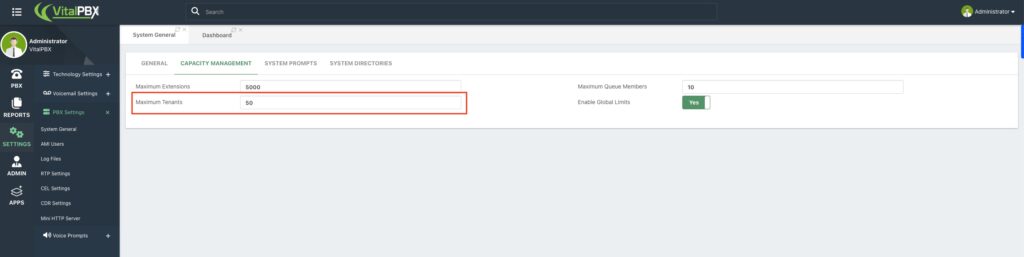
No, this is not a hard limit. While the Multi-Tenant Plan documentation recommends up to 100 tenants per single server for optimal performance, the software itself does not strictly enforce a cap at 50.
If your server currently shows an “Allowed Items” limit of 50, it is simply a default capacity setting that can be manually adjusted within your PBX interface.
How to Increase the Tenant Capacity #
To create more than 50 tenants, you must update the capacity value in your system settings:
- Navigate to Settings in the main menu.
- Go to PBX Settings > System > General.
- Click on the CAPACITY MANAGEMENT tab.
- Locate the Maximum Tenants field and enter your desired value (up to 100).
- Save your changes.
Once this value is updated, you will be able to create additional tenants without restriction, up to the new limit you have defined.
Note: VitalPBX actual performance will always depend on your server’s hardware capacity (CPU, RAM, and Storage). It is recommended to not exceed the 100 tenant quantity.